· 15 min read
DevOps Maturity: Why Friday Releases Shouldn't Scare You
If deploying on a Friday makes you nervous, your pipeline is telling you something. A practical guide to DevOps maturity, from FTP uploads to continuous delivery.
Published: · 15 min read
If deploying on a Friday makes you nervous, your pipeline is telling you something. A practical guide to DevOps maturity, from FTP uploads to continuous delivery.
“Never deploy on a Friday.”
You’ve heard this rule. You might follow it. Some teams treat it as law. Clear the calendar, lock the repo, wait until Monday.
But here’s what that rule tells you: your deployment process isn’t reliable. If a Friday deploy feels risky, any deploy is risky. You’ve chosen to contain the risk to days when someone is around to fix things.
That’s not a strategy. That’s an admission that your pipeline can’t be trusted.
About ten years ago, I worked with a client running a PHP application. Their deployment process went like this: a developer would open the production server in an FTP client, find the file they’d changed, and paste the new version over the old one.
No version control in the deploy process. No staging environment. No rollback plan. If something broke, you’d paste the old file back. If you could remember which file it was.
Every release was a gamble. Fridays weren’t the only scary day. Every day was scary.
This is where the maturity scale starts. And it’s more common than people admit.
This is the starting point. FTP uploads, SSH sessions, copying files by hand. You are the deployment pipeline.
# The "deployment process"scp ./index.php deploy@prod:/var/www/html/index.phpscp ./config.php deploy@prod:/var/www/html/config.phpssh deploy@prod "sudo systemctl restart apache2"# Check the site manually in your browser# Hope nothing brokeAt this stage, deployments are a manual checklist. Miss a step and the site goes down. Miss a file and half the features break. There’s no record of what changed, no way to undo it quickly, and no confidence that what’s in production matches what’s in your repository.
Manual deploys fail because humans make mistakes. Every step you do by hand is a step that can go wrong.
The fix here is simple: stop deploying by hand.
You write a deploy script. A bash file that SSHs into the server, pulls the latest code, runs migrations, and restarts services. One command instead of ten.
#!/bin/bashset -e
echo "Deploying to production..."ssh deploy@production << 'EOF'  cd /var/www/app  git pull origin main  composer install --no-dev --optimize-autoloader  php artisan migrate --force  php artisan config:cache  php artisan route:cache  sudo systemctl reload php-fpmEOF
echo "Deploy complete."
This is better. The process is repeatable. You won’t forget a step because the script handles it. But you still trigger it manually. You still choose when to run it. And if it fails halfway through, you’re left in an unknown state.
Rollback at this stage means running another script. Or worse, SSHing in and reverting manually. There’s no safety net. You’ve automated the steps, but the risk is the same.
Scripts reduce human error in execution. They don’t reduce the risk of deploying broken code.
The next step is to stop trusting yourself to decide when code is ready.
You set up CI/CD. Every push to main triggers a pipeline. It runs your tests, builds your application, and deploys it to production. No human in the loop for the happy path.
name: Deploy
on:  push:    branches: [main]
jobs:  deploy:    runs-on: ubuntu-latest    steps:      - uses: actions/checkout@v4
      - name: Install dependencies        run: composer install --no-dev
      - name: Run tests        run: php artisan test
- name: Deploy run: | ssh deploy@production "cd /var/www/app && git pull" ssh deploy@production "composer install --no-dev" ssh deploy@production "php artisan migrate --force" ssh deploy@production "sudo systemctl reload php-fpm"This is where most teams get comfortable. And it’s where the problems get subtle.
Your tests pass, but do they cover the right things? Your deploy succeeds, but how do you know the application is healthy afterwards? You’ve automated the process, but you haven’t automated confidence.
At this stage, Friday deploys still make people nervous. Not because the process is manual, but because you lack the observability to know if something went wrong. You find out when a user reports it.
Automation without observability is shipping blind. You’ve replaced manual risk with invisible risk.
The next step is to stop treating deployment as a single event and start treating it as a process with feedback loops.
This is where deployment stops being scary. You add feature flags, canary releases, automated rollbacks, and real observability. You don’t deploy and hope. You deploy and verify.
Feature flags let you ship code without activating it. You deploy the change, enable it for a small percentage of users, watch the metrics, and roll it out incrementally.
// Feature flag checkif (Feature::active('new-checkout-flow', $user)) {    return $this->newCheckoutFlow($cart);}
return $this->legacyCheckoutFlow($cart);
Canary deployments send a small percentage of traffic to the new version. If error rates spike, the deploy rolls back automatically. No human decision required.
strategy: canary: steps: - setWeight: 5 pause: { duration: 2m } analysis: metrics: - name: error-rate threshold: 0.01 provider: prometheus - setWeight: 25 pause: { duration: 5m } - setWeight: 100Automated rollbacks mean that if your error rate exceeds a threshold, the system reverts to the previous version without anyone touching a keyboard. You find out about problems from your monitoring, not from your users.
When your pipeline can detect and fix its own mistakes, the day of the week stops mattering.
Deploy on merge. No ceremony. No deployment windows. No “never on a Friday” rules.
At this stage, every merged pull request goes to production. The pipeline handles everything: build, test, canary, rollout, monitoring. If something breaks, it rolls back before anyone notices.
# Full pipelinename: Continuous Deploy
on:  push:    branches: [main]
jobs:  test:    runs-on: ubuntu-latest    steps:      - uses: actions/checkout@v4      - run: composer install      - run: php artisan test --parallel      - run: npm run test
  deploy:    needs: test    runs-on: ubuntu-latest    steps:      - name: Deploy canary (5%)        run: |          kubectl set image deployment/app \            app=${{ env.IMAGE }} --record          kubectl rollout pause deployment/app
      - name: Monitor canary        run: ./scripts/check-canary.sh --threshold=0.01 --duration=2m
      - name: Full rollout        run: kubectl rollout resume deployment/app
      - name: Health check        run: ./scripts/health-check.sh --retries=3
- name: Notify if: success() run: | curl -X POST $SLACK_WEBHOOK \ -d '{"text":"Deploy ${{ github.sha }} complete"}'The team doesn’t think about deployments. They think about features, bug fixes, and improvements. The pipeline is invisible. It works so reliably that nobody needs to monitor it.
Friday afternoon? Ship it. Saturday morning hotfix? Ship it. The pipeline handles the rest.
The goal isn’t to make Friday deploys safe. The goal is to make all deploys safe. Friday takes care of itself.
Everything above focuses on deploying code. Build, test, ship. But code doesn’t run in a vacuum. It runs on servers, in containers, behind load balancers, connected to databases.
If that infrastructure was provisioned by hand, you’ve solved half the problem. Your code pipeline can be flawless, but it’s only as reliable as the foundation it deploys to. A team that ships code automatically but provisions infrastructure manually still has a fragile system.
The same maturity model applies. And the same fear signal applies. If you’re afraid to touch your infrastructure, that’s telling you something.
Your servers should be defined in files. Not configured through a web console. Not set up by SSHing in and running commands. Written, committed to version control, and reviewed in pull requests.
resource "aws_ecs_cluster" "main" {  name = "production"}
resource "aws_ecs_service" "app" {  name            = "app"  cluster         = aws_ecs_cluster.main.id  task_definition = aws_ecs_task_definition.app.arn  desired_count   = 3  launch_type     = "FARGATE"
  network_configuration {    subnets          = var.private_subnets    security_groups  = [aws_security_group.app.id]    assign_public_ip = false  }
  load_balancer {    target_group_arn = aws_lb_target_group.app.arn    container_name   = "app"    container_port   = 8080  }
  deployment_circuit_breaker {    enable   = true    rollback = true  }}
resource "aws_appautoscaling_target" "app" {  max_capacity       = 10  min_capacity       = 3  resource_id        = "service/${aws_ecs_cluster.main.name}/${aws_ecs_service.app.name}"  scalable_dimension = "ecs:service:DesiredCount"  service_namespace  = "ecs"}
resource "aws_appautoscaling_policy" "cpu" {  name               = "cpu-scaling"  policy_type        = "TargetTrackingScaling"  resource_id        = aws_appautoscaling_target.app.resource_id  scalable_dimension = aws_appautoscaling_target.app.scalable_dimension  service_namespace  = aws_appautoscaling_target.app.service_namespace
  target_tracking_scaling_policy_configuration {    target_value = 60.0    predefined_metric_specification {      predefined_metric_type = "ECSServiceAverageCPUUtilization"    }  }}
This is the same shift that happened with application deployments. Manual, then scripted, then automated, then versioned. When your infrastructure is code, you get the same benefits: reproducibility, auditability, rollback, peer review.
If a server is misconfigured, you don’t SSH in and fix it. You fix the code and re-apply. The configuration file is the source of truth, not the running server.
The question “how was this server set up?” is answered by reading a file. Not by SSHing in and hoping someone documented it three years ago. Not by finding the one person on the team who originally provisioned it.
Infrastructure that exists only as a running server is infrastructure you can’t reproduce, can’t review, and can’t trust.
The next step is to stop modifying running systems entirely.
Traditional deployments update servers in place. Pull the latest code, install dependencies, restart services. The server accumulates state over time. Packages get updated, config files get tweaked, temp files pile up. After six months, the server running in production looks nothing like what you’d get from a fresh install.
Immutable infrastructure takes a different approach. You build a complete image, test it, and deploy it as a replacement. The old instance is destroyed. Every deployment starts from a clean, known state.
# DockerfileFROM php:8.3-fpm-alpine
RUN apk add --no-cache nginx supervisor
COPY --from=composer:latest /usr/bin/composer /usr/bin/composer
COPY . /var/www/appWORKDIR /var/www/app
RUN composer install --no-dev --optimize-autoloader \    && php artisan config:cache \    && php artisan route:cache \    && php artisan view:cache
COPY docker/nginx.conf /etc/nginx/nginx.confCOPY docker/supervisord.conf /etc/supervisor/conf.d/app.conf
EXPOSE 8080CMD ["supervisord", "-c", "/etc/supervisor/conf.d/app.conf"]
With immutable infrastructure, there’s no drift. The server running today is identical to the one you tested against. There’s no “works on staging but not production” because both environments are built from the same image. The same binary that passed your test suite is the same binary that runs in production.
This removes an entire class of deployment problems. Configuration drift. Missing dependencies. Orphaned processes. Accumulated state from months of patches. None of it survives a fresh deployment because every deployment is a fresh deployment.
You stop thinking about servers as things you maintain. You think about them as things you produce. If one is broken, you don’t fix it. You replace it.
If you can’t rebuild your production environment from scratch in under an hour, your infrastructure is a liability. It should be disposable.
The final piece is systems that fix themselves.
A container crashes. The orchestrator restarts it. A node runs out of memory. The auto-scaler provisions a replacement. A health check fails. Traffic routes away from the unhealthy instance automatically. No pager. No human in the loop.
# kubernetes deployment with self-healingapiVersion: apps/v1kind: Deploymentmetadata: name: appspec: replicas: 3 strategy: rollingUpdate: maxSurge: 1 maxUnavailable: 0 template: spec: containers: - name: app image: app:latest resources: requests: cpu: 250m memory: 256Mi limits: cpu: 500m memory: 512Mi livenessProbe: httpGet: path: /health port: 8080 initialDelaySeconds: 10 periodSeconds: 15 failureThreshold: 3 readinessProbe: httpGet: path: /ready port: 8080 initialDelaySeconds: 5 periodSeconds: 10 startupProbe: httpGet: path: /health port: 8080 failureThreshold: 30 periodSeconds: 2The deployment defines three replicas and three types of health check. The liveness probe catches containers that are stuck. The readiness probe prevents traffic from reaching containers that aren’t ready. The startup probe gives slow-starting applications time to initialize without being killed prematurely.
None of this requires human intervention. The system defines its own healthy state and works to maintain it. When something fails, the response is automatic and immediate. The system heals itself.
This is the real mindset shift. Individual servers, containers, and processes are disposable. They don’t matter. What matters is the desired state: three replicas running, health checks passing, traffic flowing. The system maintains that state regardless of individual component failures.
When a server fails at 3am, the auto-scaler replaces it before anyone wakes up. When a container crashes during peak traffic, the orchestrator restarts it in seconds. The failure becomes a log entry, not an emergency.
Self-healing infrastructure means 3am failures become morning log entries, not emergency phone calls.
Everything above falls apart without visibility into what’s actually happening.
Your pipeline can deploy automatically. Your infrastructure can heal itself. But if the first time you hear about an error is when a customer emails support, none of it matters. You’ve built a system that fails silently. And silent failure is the worst kind.
APM (Application Performance Monitoring) is not optional. It’s the difference between knowing your system is healthy and hoping it is.
// Instrument critical paths with tracinguse OpenTelemetry\API\Trace\TracerInterface;use OpenTelemetry\API\Trace\StatusCode;
class CheckoutController{    public function __construct(        private TracerInterface $tracer,    ) {}
    public function process(Request $request): Response    {        $span = $this->tracer->spanBuilder('checkout.process')            ->setAttribute('cart.items', count($request->items))            ->setAttribute('cart.total', $request->total)            ->startSpan();
        try {            $result = $this->processPayment($request);            $span->setAttribute('payment.status', $result->status);            return response()->json($result);        } catch (\Throwable $e) {            $span->recordException($e);            $span->setStatus(StatusCode::STATUS_ERROR);            throw $e;        } finally {            $span->end();        }    }}
This isn’t logging. Logs tell you what happened after you already know something went wrong. Observability tells you something is going wrong right now, and exactly where.
A proper setup gives you four things.
Metrics. Response times, error rates, throughput, saturation. Not “is the server up?” but “is the server healthy?” A 200 OK that takes 8 seconds is not healthy. An error rate of 0.5% on your checkout endpoint is not healthy. You need numbers, thresholds, and alerts that fire when those numbers cross a line.
Distributed tracing. A single request might touch your API, your database, a cache layer, a payment service, and a notification queue. When that request takes 12 seconds, tracing shows you exactly where the time went. Without it, you’re guessing. With it, you can see that the payment service call took 11.4 seconds and everything else was fine.
Error tracking. Every unhandled exception, every 5xx response, every failed background job. Captured automatically, grouped by root cause, with full stack traces and request context. Tools like Sentry do this well. You should be using one.
Alerting. Meaningful alerts with defined thresholds. Not “the server returned a 500” but “the error rate on /api/checkout exceeded 1% over the last 5 minutes.” Alerts should tell you something is wrong, not that something happened. An individual error is noise. A pattern of errors is a signal. Your alerting should know the difference.
When your APM detects a spike in error rate after a deployment, the system can roll back automatically. The alert fires, the rollback happens, and by the time you read the Slack notification, the problem is already resolved. Your users never saw it.
Compare that to the alternative. A customer emails support. Support creates a ticket. An engineer picks it up the next morning. They check the logs. They find the error. They deploy a fix. That’s hours. Sometimes days. And every minute of that window, your users are hitting the same broken checkout page.
The teams that deploy on Fridays without thinking about it are the teams that trust their observability. They know that if something breaks, they’ll know within seconds. Not because someone checked. Because the system told them.
If your users are your error detection system, you don’t have observability. You have a complaint form.
When you combine all of this, the picture changes completely.
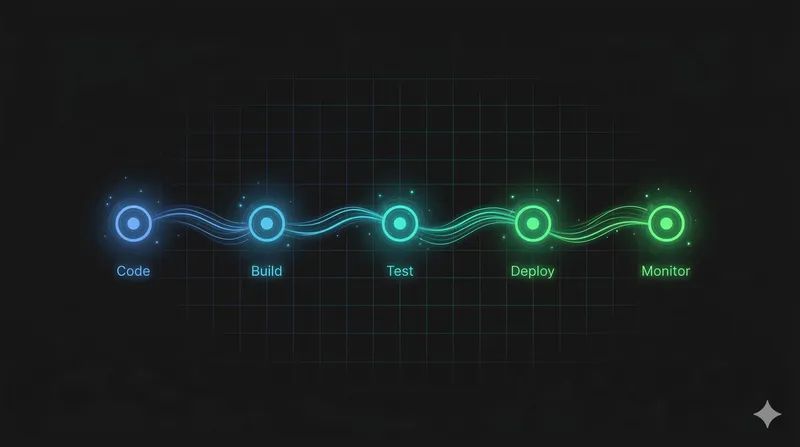
Your code is tested and deployed automatically. Your infrastructure is defined in version-controlled files and provisioned on demand. Your images are immutable and reproducible. Your observability catches problems in seconds. Your systems detect failures and recover without human intervention.
The full lifecycle:
Every step is automated. Every step is versioned. Every step can be rolled back. There is no manual intervention at any point in the process. The system is the same at 2pm on a Tuesday and 11pm on a Friday.
This is the state where deployment fear doesn’t exist. Not because you’ve decided to be brave about it. Because you’ve built a system where bravery isn’t required. The pipeline catches code problems. The observability catches runtime problems. The infrastructure heals itself. The day of the week is irrelevant.
The “never deploy on Friday” rule is a symptom. It tells you that your team doesn’t trust the pipeline to catch problems. It tells you that recovery depends on humans being available, alert, and fast.
If that sounds like your team, you don’t need a deployment freeze. You need a better system.
Start where you are. If you’re copying files over FTP, write a deploy script. If you have CI/CD but no monitoring, add health checks. If your users are reporting errors before your team knows about them, set up APM. If your servers were hand-provisioned two years ago, start writing Terraform. If you’re running containers but not checking their health, add probes.
Each step reduces the fear. Each step makes the day of the week less relevant. Each step moves you closer to a system where deployments are boring. And boring deployments are the goal.
The question isn’t “should I deploy on Friday?” The question is “why can’t I?”
· 15 min read
If deploying on a Friday makes you nervous, your pipeline is telling you something. A practical guide to DevOps maturity, from FTP uploads to continuous delivery.
· 3 min read
A MechWarrior gaming community I joined at 13 is the reason I became a software engineer. I recently reconnected with someone from that world, 26 years later.